Long-running queries in MySQL can significantly impact the performance and availability of your database. They can consume server resources, lock tables, and block other queries, leading to cascading performance issues. In this blog, we will explore why long-running queries occur, how to detect them, and best practices for managing and optimizing them.
Table of Contents:
- Optimize query design
- Partition large tables
- Use query timeouts
- Monitor and kill problematic queries
- Implement query caching
- Upgrade your infrastructure
- Enable read replicas
Understanding long-running queries
A query is considered "long-running" if it takes an unusually long time to complete compared to the typical workload. Common causes include:
- Inefficient Query Design: Poorly written SQL statements, missing indexes, or unnecessary joins.
- High Data Volume: Queries scanning millions of rows due to lack of filtering or indexing.
- Locking Issues: Queries waiting for locks due to concurrent updates or table-level locks.
- Insufficient Resources: Server resource constraints such as CPU, memory, or I/O bottlenecks.
- Network Latency: Delays in retrieving data over the network.
Detecting long-running queries
Efficient database performance is critical for application responsiveness. Below are three effective methods to detect and address such queries in MySQL.
1. Using MySQL Slow Query Log
Enable the slow query log to capture queries that exceed a specific execution time threshold. This helps identify potential performance bottlenecks.
SET GLOBAL slow_query_log = 1;
SET GLOBAL long_query_time = 1; -- Log queries taking longer than 1 second
The log file (slow_query_log_file) will contain details about slow queries, their execution time, and their frequency.
2. Using the 'information_schema'
Query the information_schema.PROCESSLIST table to identify currently running queries and their execution time.
SELECT
    ID,
    USER,
    HOST,
    DB,
    COMMAND,
    TIME,
    STATE,
    INFO
FROM
    information_schema.PROCESSLIST
WHERE
    COMMAND != 'Sleep' AND TIME > 5;
3. Using performance schema
The Performance Schema provides a granular view of query performance. You can monitor long-running queries using tables like events_statements_history_long.
SELECT
    EVENT_ID,
    SQL_TEXT,
    TIMER_WAIT / 1000000000 AS EXECUTION_TIME_MS
FROM
    performance_schema.events_statements_history_long
ORDER BY EXECUTION_TIME_MS DESC
LIMIT 10;
These methods help you find and fix slow queries, improving database performance and ensuring a better user experience.
Strategies for managing long-running queries
Here are some strategies to help you manage long-running queries and improve database performance:
1. Optimize query design
- Use indexes: Indexes significantly speed up data retrieval. Analyse query execution plans using
EXPLAINto identify missing indexes. - Avoid
SELECT: Fetch only the required columns to reduce data transfer overhead. - Use joins efficiently: Ensure joins use indexed columns and avoid unnecessary joins.
- Break down queries: Divide complex queries into smaller, more manageable parts.
2. Partition large tables
Partitioning splits a large table into smaller, more manageable pieces. This can speed up queries by limiting the data scope.
CREATE TABLE orders (
    id INT NOT NULL,
    order_date DATE NOT NULL,
    PRIMARY KEY (id, order_date)
) PARTITION BY RANGE (YEAR(order_date)) (
    PARTITION p0 VALUES LESS THAN (2000),
    PARTITION p1 VALUES LESS THAN (2010),
    PARTITION p2 VALUES LESS THAN (2020)
);
3. Use query timeouts
Set timeouts to kill long-running queries automatically. This prevents a single query from monopolizing resources.
SET GLOBAL max_execution_time = 1000; -- 1000 ms
4. Monitor and kill problematic queries
Regularly monitor the process list and kill queries that exceed acceptable execution times.
KILL QUERY <query_id>;
5. Implement query caching
Enable the query cache to store results of frequently executed queries, reducing execution time for identical queries.
SET GLOBAL query_cache_size = 128M;
SET GLOBAL query_cache_type = ON;
Note: Query caching is deprecated in MySQL 8.0. Use application-level caching instead.
6. Upgrade your infrastructure
If resource constraints are causing slow queries, consider upgrading hardware or migrating to a cloud solution that scales dynamically.
7.Enable read replicas
Offload read queries to replicas to reduce the load on the primary server.
By applying these strategies, you can effectively manage long-running queries and ensure better performance.
Preventive Measures
- Regular maintenance: Rebuild indexes and update statistics regularly to ensure optimal performance.
- Query reviews: Perform periodic code reviews of SQL statements for efficiency.
- Monitoring tools: Use monitoring tools like MySQL Enterprise Monitor, Percona Monitoring and Management (PMM), or third-party solutions like Atatus database monitoring to track query performance.
- Set resource limits: Configure user-specific limits using MySQL's resource control.
Managing long-running queries in MySQL requires a combination of proactive monitoring, query optimization, and infrastructure management. By understanding the root causes, leveraging MySQL's built-in tools, and following best practices, you can minimize the impact of slow queries and maintain a high-performing database environment.
Database Monitoring with Atatus
Atatus Database Monitoring simplifies real-time tracking of your database performance, offering deep insights into query execution, lock time, wait time, rows sent, rows scanned, rows affected, and resource utilization.
Additionally, it provides support for explain plans, allowing you to visualize and analyze the execution path of queries, identify bottlenecks, and optimize performance for both SQL and NoSQL databases.
Atatus supports a wide range of databases, including SQL databases such as MySQL, PostgreSQL, MariaDB, and SQLite. It also supports NoSQL databases like MongoDB, Redis, Memcached, and Aerospike.
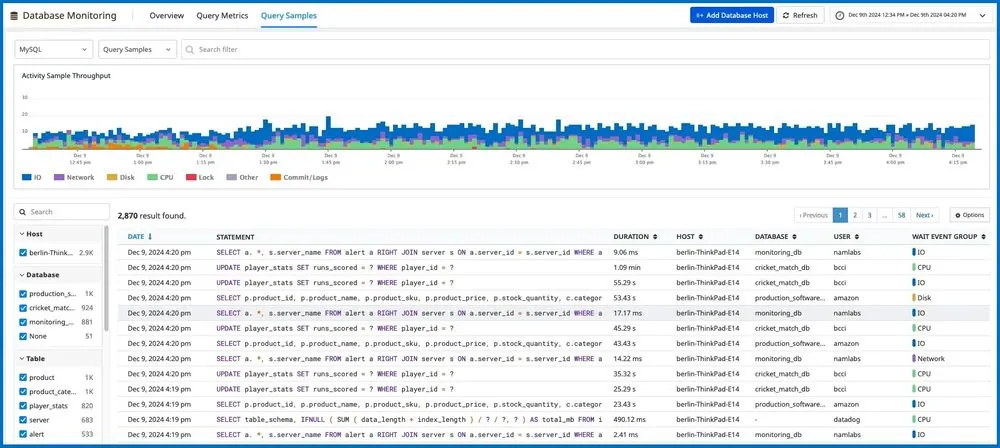
Key features of Atatus Database Monitoring:
- Query Performance Insights: Analyse SQL and NoSQL query performance with detailed metrics on execution times, latency, and throughput. Identify slow queries and drill down into their execution plans using
EXPLAINcalls to uncover bottlenecks and inefficiencies. - Active Connections Tracking: Monitor the number of active connections to your database, ensuring that connection limits are not exceeded and troubleshooting potential bottlenecks caused by excessive concurrency.
- Optimization Recommendations: Receive actionable suggestions for query and database optimization, such as adding indexes, restructuring queries, or reconfiguring database settings to improve performance.
Start your 14-day free trial with Atatus today!